What to do when a vacancy closes?
When a vacancy closes it is good practice to do the following:
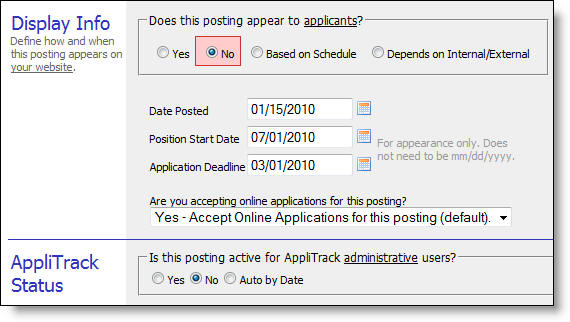
1) In the Display Info section, change Does this posting appear to applicants? to No. This prevents applicants from seeing the vacancy and stops new applications from coming in. Once vacancy is closed, the applicants in it are "frozen" so that you will have a permanent record of who applied to the vacancy.
2) In the AppliTrack Status section, change Is this posting active for AppliTrack administrative users? to No. This removes the vacancy from the administrator's Find Applications -> By Vacancy screen. You may choose to hold off on this until you no longer need daily access to the applicant list.
----------------------- or -----------------------
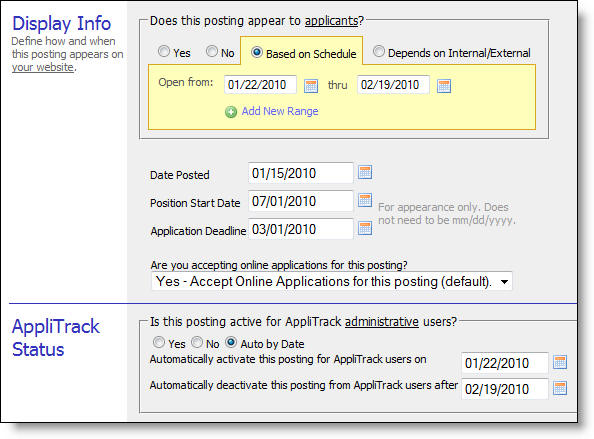
3) Make the computer do it for you by clicking on Based on Schedule (or selecting Auto By Date) and adding the dates you wish the positions to show and close.
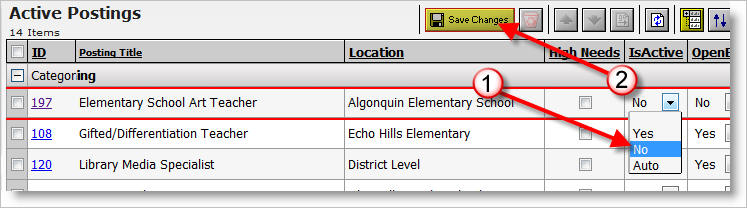
Note: You can also change the OpenExternal, OpenInternal and IsActive fields for many postings at the same time.
Here's How:
1) Within a list of postings, scroll to the "IsActive" column and change the value as needed. Do this for all postings you would like to modify.
2) Click the "Save Changes" button.
Please refer to the Show/Hide Vacancies help topic to see how to show applicants for closed vacancies on the By Vacancy screen.